OnePlus FRP Bypass OxygenOS 12/13/14: The Working Guide [2025]
Stuck on OnePlus FRP? “No PC” methods fail on OxygenOS 13/14. Learn why the manual MSM tool is risky and how to use DroidKit to unlock your device safely.
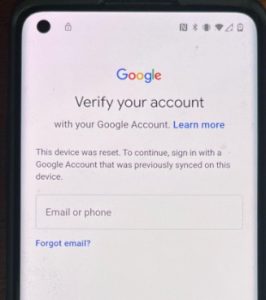
That sinking feeling of getting a second-hand OnePlus only to hit a “Verify your account” wall is a major roadblock. It instantly turns a powerful device into a paperweight. If you’ve already spent hours trying outdated YouTube methods or fighting with PC drivers that won’t install, you know the frustration well.
Most guides promise a quick fix but fail against the security in modern OxygenOS 12, 13, and 14, leaving you completely stuck.
This guide provides a direct, tested solution for the OnePlus FRP bypass. We’ll get straight to the core issues—from Qualcomm driver complications to the failure of old ‘no PC’ methods—and give you a clear, actionable procedure to regain access to your device. All information is based on hands-on testing with the OnePlus 6 through 12 models and Nord variants.
Bypass FRP on OnePlus
Which OnePlus FRP Bypass Method Is Right for You?
Not all FRP removal procedures work for every OnePlus device. The most critical factors are your OxygenOS version and phone model, as Google and OnePlus have patched the software exploits that worked on older systems. Use this framework to identify the correct solution for your situation.
Step 1: Identify Your OxygenOS Version
- OxygenOS 11 or older: You might have some success with legacy ‘no PC’ methods involving the TalkBack feature or emergency dialer codes. Be aware that these exploits have a very low success rate on devices with recent security patches.
- OxygenOS 12, 13, or 14: These newer versions require a PC-based solution. The old software loopholes have been permanently closed. Proceed to Step 2.
Step 2: Determine Your Hardware & Technical Comfort Level
-
For Advanced Users (OnePlus 8 & Older): The manual method using the MSM Download Tool in Qualcomm EDL 9008 mode is an option. This requires specific drivers, the correct firmware, and carries a risk of bricking your device.
-
For Newer Models (OnePlus 9, 10, 11, 12): Most of these devices require an authorized service account to use the MSM Tool, making the manual method impractical. Additionally, many require physically opening the device to use “test points.”
-
For Most Users: A professional OnePlus FRP removal tool is the recommended solution. These software tools are designed for safety and efficiency, supporting specific models with a much higher success rate.
Comparing Solutions: The Manual Method vs. a Professional Tool
When facing an FRP lock on a modern OnePlus device, you have two primary paths: a complex manual procedure or a dedicated professional tool.
| Feature | Manual Method (MSM Tool) | Professional FRP Tool (DroidKit) |
| Success Rate | Moderate to Low (Varies by model & user skill) | High to Very High |
| Time Cost | 2-5 hours (Includes research & troubleshooting) | 10-20 minutes |
| Technical Skill | Advanced (Requires hardware & software knowledge) | Beginner to Intermediate |
| Safety Risk | High (Risk of bricking device, data loss) | Low (Built-in safety protocols) |
| Support | None (Relies on community forums) | Professional Customer Support |
Verdict: The manual method is free but highly technical. The professional tool is paid but saves hours of frustration and eliminates the risk of loading the wrong regional firmware (e.g., flashing EU ROM on a T-Mobile device).
Advanced Manual Method: Using MSM Download Tool via EDL Mode
For advanced users, the most powerful manual method for a OnePlus FRP bypass with pc is flashing firmware via EDL mode. Emergency Download (EDL) mode is a low-level Qualcomm recovery state that allows direct communication with the chipset. This enables tools like the MSM Download Tool to re-flash the software and remove the FRP lock.
However, this process is filled with obstacles. We believe in being honest about them so you can decide if it’s the right approach for you.
Obstacle 1: Entering EDL Mode (Test Points)
How you enter EDL mode depends on your model. This is a critical first step.
-
Older Models (OnePlus 8 & earlier): Power off, hold Volume Up + Volume Down, and connect USB.
-
Newer Models (OnePlus 9 & newer): Button combinations are often disabled. You must open the phone and short two specific “test points” on the motherboard with metal tweezers.
⚠️ Warning: Shorting test points requires opening your device. This voids your warranty and can physically damage hardware components if done incorrectly.
Obstacle 2: Fixing Qualcomm 9008 Driver Issues
Your phone must appear in Windows Device Manager as “Qualcomm HS-USB QDLoader 9008”. If you see a yellow triangle, the connection has failed.
How to Disable Driver Signature Enforcement (Windows 10/11):
-
Click Start > Power. Hold Shift and click Restart.
-
Select Troubleshoot > Advanced options > Startup Settings > Restart.
-
Press F7 to select “Disable driver signature enforcement.”
-
Once rebooted, manually install the Qualcomm 9008 drivers.
Obstacle 3: The MSM Tool Authorization Wall
Even if you manage EDL mode, most MSM Download Tool packages for newer models (OnePlus 9/10/11) now require an authorized service account login. These are not available to the public, making this free method a dead end for most modern OnePlus devices.
Why ‘No PC’ Methods No Longer Work on OxygenOS 12-14
If you have searched for a “OnePlus FRP bypass without PC,” you have found videos demonstrating methods using TalkBack or emergency dialer codes.
It is critical to understand: These methods rely on old software exploits that have been systematically closed by Google and OnePlus updates.
-
On OxygenOS 12, 13, and 14, these loopholes do not exist.
-
ADB/Fastboot commands are not viable because USB debugging cannot be enabled from the lock screen.
The Recommended Solution: Using DroidKit
For modern devices running OxygenOS 13 or 14, the fastest and most reliable method is using a professional tool like DroidKit.
It works differently from manual methods. Instead of requiring you to hunt for “test points” or authorized logins, DroidKit automates the developer protocols to communicate with your device.
-
Security: Verified software that runs locally on your PC.
-
Effectiveness: Regularly updated to handle the newest security patches for OnePlus models.
-
Simplicity: Connect your phone, select the model, and follow clear on-screen instructions.
Your OnePlus FRP Bypass Questions, Answered
How do I know if my OnePlus is FRP-locked?
After a factory reset, if the phone asks for the “previously synced Google Account,” it is FRP-locked. If it gives you an option to “Use my Google Account instead” of a PIN or pattern, this is also part of the Google account verification. A simple lock screen PIN request before a reset is just standard security, not FRP.
Does any ‘no PC’ TalkBack method still work on OxygenOS 13/14?
No. As of the latest security patches, all known ‘no PC’ exploits have been patched by OnePlus and Google. These methods will not work on modern OxygenOS versions.
What is the fastest method for a OnePlus 9, 10, 11, or 12?
For these modern devices, manual solutions are often impossible due to account authorization requirements. A dedicated software tool automates these steps and typically completes the OnePlus FRP unlock without a password in under 15 minutes.
How can I avoid FRP lock in the future?
The easiest way is to manually remove your Google account before performing a factory reset. Go to Settings > Accounts > Remove account. This is a crucial step before selling your phone.
Regain Access to Your OnePlus Device Today
Facing a Google account lock is a significant technical barrier, especially when time is a factor and the risk of damaging your device is high. As we’ve shown, manual methods on modern devices are complex, risky, and often impossible due to security measures like authorized accounts.
You can bypass the hours of troubleshooting and the fear of bricking your phone. A professional FRP solution like DroidKit is designed to solve this exact problem efficiently and safely. It handles the driver installation and the secure handshake with your device, allowing you to regain full control of your OnePlus smartphone in minutes, not hours. Download the free trial to confirm compatibility and see how it can get your device running again.
More Related Articles
- The Ultimate 2025 Guide to bypass Google FRP on BLU Phones
- How to bypass the FRP Lock on Moto G Play (Android 10) in 2025
- Pixel 7a FRP Bypass: Real Solutions for Android 14 (2025)