Your Guide to Pixel 7a FRP Lock: Recovery & Solutions (2025)
Pixel 7a FRP bypass (no PC) methods are patched on Android 14. Our guide gives the only tested, safe solutions: official Google recovery or proof of purchase.
Staring at the “Verify your account” screen on your Google Pixel 7a is a hard stop. If you bought a used phone that’s now a paperweight or spent hours on YouTube tutorials that don’t work, you know the frustration. You came looking for a “bypass,” a quick technical fix to get the phone working today.
Let’s be direct: for a Pixel 7a running the latest Android 14 security patch, the old tricks are gone. This guide isn’t another dead end. We’ll explain why those methods fail and walk you through the official recovery solutions that actually work. Whether you’re the original owner or have a second-hand device, this is the correct information to solve the problem without risking malware or wasting more of your time.
Which Solution Is Right for Your Pixel 7a?
Before starting, let’s identify your exact situation. Answering these questions will point you to the correct section of this guide, saving you time and effort.
- 1. Are you the original owner and know the Google account email and password?
- Yes: This is the most straightforward fix. Proceed to Method 1: The Official Google Account Recovery Process.
- No: Continue to the next question.
- 2. Did you change your Google account password in the last 72 hours?
- Yes: This is a common security feature. Go to Method 1 and read the specific instructions on Google’s security waiting period.
- No: Continue to the next question.
- 3. Did you buy the Pixel 7a second-hand, and it’s locked to the previous owner’s account?
- Yes: Your situation requires a different approach. Jump directly to How to Handle FRP on a Second-Hand Pixel 7a.
Method 1: The Official Google Account Recovery Process
For original owners, the most reliable and secure way to unlock your Pixel 7a after a reset is by using the Google account credentials that were previously on the device. This is the intended Google account recovery procedure.
Standard Sign-In
When you encounter the ‘Verify your account’ screen, simply enter the email and password for the Google account that was last active on the phone. If the credentials are correct, the device protection lock will be removed, and you can proceed with the setup.
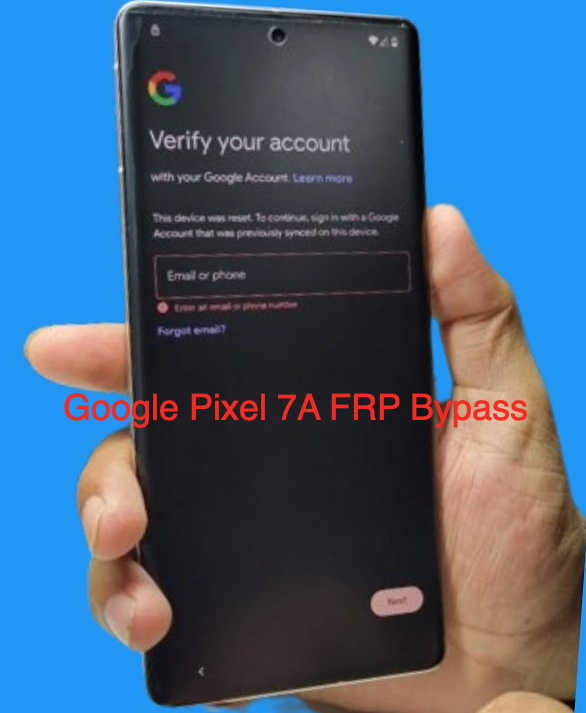
The Factory Reset Protection (FRP) lock screen on a Google Pixel 7a
The 24-72 Hour Post-Password-Change Waiting Period
If I just changed my Google password, how long must I wait to sign in?
This is a frequent point of confusion. If you recently changed your Google account password and then immediately performed a factory reset, you will trigger a security lockout. Google enforces a mandatory waiting period of 24 to 72 hours after a password change before you can use the new credentials to unlock after reset.
This is an intentional security measure, not an error. It prevents someone who gains access to your account from immediately changing the password, resetting your device, and locking you out. If you’re in this situation, power the device off, wait a full 72 hours, and then try signing in again with your new password. Patience is the only solution here.
How to Handle FRP on a Second-Hand Pixel 7a
If you bought a used Pixel 7a that is locked, your only safe options involve proving legitimate ownership through official channels. Do not resort to questionable third-party software.
Strategy 1: Contact the Original Seller
The fastest solution is to have the previous owner remotely remove the device from their Google account. They do not need the phone in their possession to do this.
Sample Message Template:
Subject: Action Required: Please remove Pixel 7a from your Google Account
Hello [Seller’s Name],
I am writing about the Pixel 7a I purchased from you on [Date] (Transaction ID: [ID Number]). The phone is currently secured by Factory Reset Protection linked to your account. To complete the setup, could you please remove the device from your Google account?
The instructions are to visitgoogle.com/android/find, select the Pixel 7a, and choose the option to remove it from the account. Thank you for your help.
Strategy 2: Submitting Your Proof of Purchase to Get Help
If the seller is unresponsive, your next step is to contact the original retailer, carrier, or Google Support with valid proof of ownership.
What proof do I need for Google or the retailer to help me unlock it?
Gathering these documents beforehand will significantly speed up your support request.
- The Original Receipt or Invoice: This is the most crucial document.
- Marketplace Transaction Details: A screenshot of the eBay, Swappa, or other marketplace transaction showing the item, date, and transaction ID.
- Email Correspondence: The complete communication history with the seller.
- Device Information: The phone’s IMEI number, which can be found on the SIM tray or sometimes by tapping on the emergency call screen during setup.
What to Expect from the Support Process
Once you have your documents, you need to start a support ticket. This is the part of the process where many people get stuck.
- Where to Go: Start with the entity you purchased the device from. If you bought it new from Best Buy, start with their support. If you bought it directly from the Google Store, use their hardware support channel. For carrier-locked devices, contact the carrier’s customer service.
- The Process: You will typically need to submit your documentation through a support portal or email. Clearly explain the situation: you are the legitimate owner of a second-hand device and need the FRP lock removed.
- Pro Tip From Experience: Don’t be discouraged if your first response is an automated denial. This is common. Often, you need to reply to that initial email to escalate the ticket to a human agent who can review your proof of purchase. Persistence is key.
Why Outdated Android 14 FRP Bypass Methods Fail
You’ve likely seen videos promoting quick fixes. On a Pixel 7a with a modern Android security patch, these do not work. Attempting them is a waste of time. Here is a technical breakdown of why they are obsolete.
Confirmed Ineffective Methods on Recent Android 14 Patches
| Method/Exploit | Status on Security Patch May 2024 & Later | Why It Fails |
| TalkBack / Accessibility | Patched | Google has removed the ability to launch a web browser or settings menu from the accessibility services during initial setup. The UI vulnerability has been closed. |
| Emergency Dialer Code | Patched | The codes that once opened hidden diagnostic menus or settings from the emergency dialer screen are now disabled before the device is fully set up. |
| SIM Card Eject Trick | Patched | The exploit that allowed access to device settings by quickly ejecting and reinserting the SIM card at a specific moment in the setup wizard has been fixed. |
Can you use ADB or fastboot to remove the lock?
No. To use ADB (Android Debug Bridge), the ‘USB debugging’ option must be enabled from within the phone’s developer settings. After a factory reset, USB debugging is always disabled by default, which means ADB commands cannot be sent to the device.
Will flashing factory images or unlocking the bootloader remove FRP?
No, neither of these actions will remove the Google account lock.
- Flashing with fastboot: Reinstalling the stock Android OS wipes user data, but it does not touch the FRP status. FRP is a server-side flag linked to Google’s servers, not a piece of software on the phone itself.
- Bootloader unlock (Pixel) / OEM unlocking: This is a separate security feature that allows flashing custom software. It does not affect the Google account verification requirement.
Our Commitment to Accuracy
The information in this guide is based on direct testing and an analysis of Google’s official security protocols for Factory Reset Protection on Pixel devices. We are committed to providing safe, effective, and up-to-date information to help users solve problems without compromising their security.
Frequently Asked Questions
Here are direct answers to common questions about the FRP lock on the Google Pixel 7a.
Is there any way to remove FRP on my Pixel 7a without the original Google account?
If you cannot contact the original owner, the only safe method is to provide official proof of purchase to the retailer, carrier, or Google Support. Any tool claiming to bypass FRP without pc on Pixel 7a or with a one-click application on an updated device is likely ineffective or unsafe.
Are paid FRP tools for Pixel legit, and what are the risks?
The market for these tools is high-risk. The main dangers are malware infection on your computer, potential theft of your personal data, and paying for software that simply doesn’t work on the latest Android 14 security patches.
How do I avoid scams when searching for FRP removal tools?
The best policy is to avoid downloading any APKs or executables that promise an easy fix. These files are a primary vector for distributing malware. Stick to the official procedures: use the correct account credentials or provide valid proof of ownership.
What are my options if I bought a locked second-hand phone?
Your primary options are to contact the seller for remote removal of the device from their account or to gather your proof of purchase and contact official support channels (e.g., the retailer or carrier you bought it from).
Conclusion
Regaining access to your Pixel 7a doesn’t require risky software or complex, outdated commands. By understanding the correct procedure for your situation, you can resolve the Factory Reset Protection lock safely. For original owners, patience through Google’s security waiting period is often the answer. For second-hand buyers, clear communication with the seller or having your proof of purchase ready is the most effective path forward. You now have the right information to regain full control of your device without compromising your data or security.
More Related Articles
- The Ultimate 2025 Guide to bypass Google FRP on BLU Phones
- How to bypass the FRP Lock on Moto G Play (Android 10) in 2025
- Bypass FRP on Samsung A12 Without PC [2025 Guide]