The Ultimate Google FRP Bypass Guide for BLU Phones (2025)
Locked out of your BLU phone? Standard FRP bypass APKs fail. Our guide shows how to ID your chipset (MTK/Unisoc) and use the correct free PC tool (SP Flash/ResearchDownload).
Purchasing a used BLU phone, only to be blocked by the previous owner’s Google account, is deeply frustrating. What should be a useful device becomes a paperweight, and the search for a solution often leads down a rabbit hole of questionable websites and non-working APKs. If you’ve faced the “Google Account Verification” screen on a model like the BLU G91 after a factory reset, you know this feeling well.
This guide provides a tested, reliable solution. We will walk you through the free, manual methods that technicians use, which require careful file sourcing and driver installation.
For those who prefer a simpler, automated process, software like Dr.Fone, DroidKit, or AppGeeker Android Unlocker handles driver installation and file selection for you, reducing the risk of errors. For the complete manual steps, continue below. Here, you will find a clear, step-by-step process for safely and effectively performing a Google FRP bypass on a Blu phone.
Why PC Tools Are the Right Choice for Your BLU FRP Bypass
When you first encounter Factory Reset Protection (FRP), your search likely points you toward APK-based methods. These often involve downloading apps from untrustworthy sources to exploit a security loophole. As many users discover, this approach is rarely successful on newer Android versions and carries a significant risk.
Let’s compare this with the stable, PC-based methods covered in this guide.
| Factor | PC-Based Tools (Recommended) | APK-Based Methods (Not Recommended) |
| Success Rate | Very high (near 100% with correct procedure) | Very low on Android 10+; exploits are quickly patched. |
| Safety Risk | Low, when using standard developer tools from trusted sources. | High; APKs can contain malware, adware, or spyware. |
| Technical Skill | Requires initial setup (drivers, software). | Seems simple, but often involves complex, non-working steps. |
| Time Cost | Fast execution once set up (typically under 5 minutes). | It can lead to hours of trial-and-error with no result. |
The PC-based FRP bypass approach is a direct, technical solution that interfaces with the phone’s hardware, bypassing Android’s security restrictions that prevent unauthorized access or app installation. It is considered the most reliable method for bypassing FRP on BLU phones.
Step 1: Identify Your BLU Phone’s Chipset
The success of this entire process depends on using the right tool for your phone’s specific hardware. BLU primarily uses two chipset manufacturers: MediaTek (MTK) and Unisoc (formerly Spreadtrum, or SPD). An MTK tool will fail on a Unisoc phone, and vice versa. This is the most common point of failure.
- Find Your Model Name: Look on the back of your phone or the original box (e.g., BLU G91, BLU Studio X10).
- Search for Specs Online: Use a trusted device database like GSMArena. For example, search Google for “BLU G91 specs GSMArena”.
- Check the “Platform” or “Chipset” Section:
- If it lists MediaTek or Helio, your phone is an MTK device.
- If it lists Unisoc or Spreadtrum, your phone is an SPD device.
To make it easier, here are the chipsets for some common BLU models:
| BLU Phone Model | Chipset Manufacturer | Proceed To… |
| BLU G90 / G90 Pro / G91 | MediaTek (MTK) | Method 1 |
| BLU Studio X10 / X12 | Unisoc (SPD) | Method 2 |
| BLU View 2 | MediaTek (MTK) | Method 1 |
| BLU C5L | Unisoc (SPD) | Method 2 |
| BLU J6 | Unisoc (SPD) | Method 2 |
This simple check ensures you are using the correct software from the start.
Step 2: The Critical Pre-Check That Prevents Bricking Your Phone
This is the most important advice in this guide. Using the wrong firmware file (a Scatter file for MTK or a PAC file for Unisoc) is the primary way users accidentally “brick” their phones, making them unusable. To prevent this, you must match the file to your phone’s exact software build number.
- Boot into Recovery Mode: Power off your BLU phone completely. Then, press and hold the Power button + Volume Up button together until the screen lights up. Release the buttons when you see the Android recovery menu.
- Find Your Build Number: Use the volume keys to navigate the menu. You will see a line of text that includes your device model and a long string of characters—this is your build number (e.g.,
BLU_G0310WW_V11.0.05.01_GENERIC). - Write It Down: Take a photo of this screen or write down the full build number. When you search for your firmware file in the next steps, you MUST find one that matches this exact number, not just the model name.
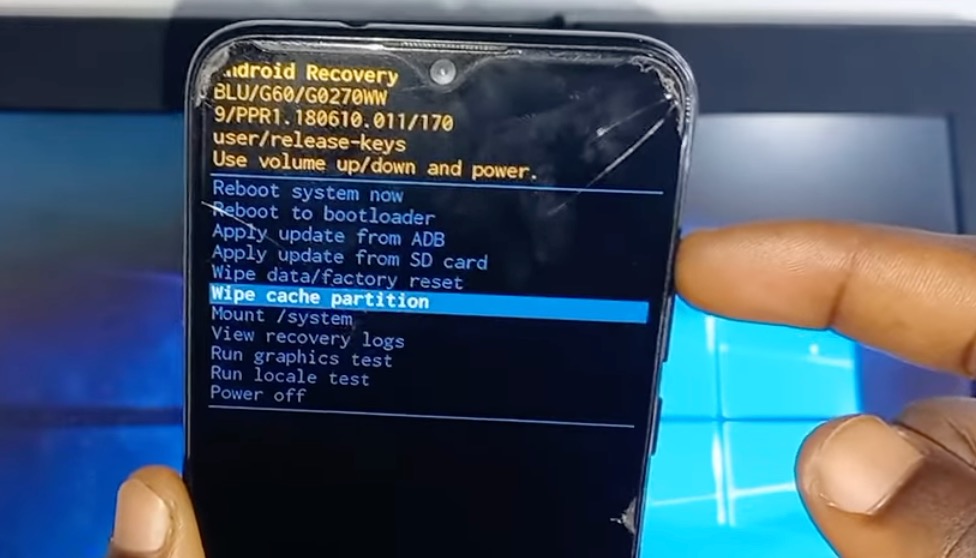
BLU phone in Android recovery mode
Method 1: Google FRP Bypass for MediaTek (MTK) BLU Phones
If you’ve confirmed your BLU phone has a MediaTek chipset, we will use the SP Flash Tool, a standard utility for MTK devices.
Prerequisites:
- A Windows PC and a quality USB cable.
- MediaTek USB VCOM Drivers: These are essential for your PC to communicate with the phone. For a safe download, we recommend sourcing an all-in-one driver pack from trusted mobile repair communities like Hovatek or XDA-Developers.
- SP Flash Tool: For a safe BLU FRP tool download, get the latest version from the official SP Flash Tool website or the same trusted forums. Avoid sites with aggressive pop-ups or fake “Download” buttons.
- Scatter File: This text file (
.txt) maps your phone’s partitions. This is a high-risk step. Search on a trusted forum for “[Your Full Build Number] scatter file”. A mismatched scatter file can damage your phone. Do not proceed if you cannot find an exact match.
Step-by-Step Instructions:
- Install MTK VCOM Drivers: Run the driver installer. If you encounter issues, you may need to disable Driver Signature Enforcement in Windows. To verify, open Device Manager, power off your BLU phone, and connect it. The ‘MediaTek PreLoader USB VCOM Port’ should briefly appear.
- Load Scatter File: Launch SP Flash Tool. On the ‘Download’ tab, click ‘Choose’ next to ‘Scatter-loading File’ and select the matching scatter file you downloaded.
- Find the FRP Address: Open the scatter file with Notepad. Use Ctrl+F to find the partition name
frp. Note thelinear_start_addrandpartition_sizevalues. - Configure the Format Operation: In SP Flash Tool, go to the ‘Format’ tab. Select ‘Manual Format Flash’.
- Copy the
linear_start_addrinto the ‘Begin Address[HEX]’ field. - Copy the
partition_sizeinto the ‘Format Length[HEX]’ field. - Triple-check these values. An error here is dangerous.
- Copy the
- Execute the Bypass: Click ‘Start’. With your phone off, connect it to the PC. The tool will detect it, format the FRP partition, and a green checkmark will confirm success.
Disconnect and reboot your phone. The Google account verification screen will be gone.

SP Flash Tool is configured for a manual format to perform a MediaTek MTK FRP bypass.
Method 2: Bypass Google Lock on Unisoc (SPD) BLU Phones
For BLU devices with a Unisoc (SPD) chipset, we’ll use the ResearchDownload or UpgradeDownload tool. This is a highly effective way to bypass Google lock on BLU phone models with this hardware.
Prerequisites:
- A Windows PC and a quality USB cable.
- SPD SCI USB Drivers: As with the MTK drivers, find a reliable SPD driver pack from a trusted source like the forums mentioned earlier.
- Research Download Tool: Search for the latest version on the same forums to ensure you have a clean copy.
- PAC File: This is a firmware package (
.pac). This is a high-risk step. You must find the correct file by searching for your phone’s full build number (e.g., “BLU_C0070WW_V11… PAC file”). A mismatch for your region or version can cause problems.
Step-by-Step Instructions:
- Install SPD Drivers: Run the driver installer and restart your PC.
- Load PAC File: Launch ResearchDownload. Click the first gear icon (‘Load Packet’) and select the
.pacfile for your BLU model. It may take a minute to load. - Configure for FRP Removal: Click the second gear icon (‘Settings’). On the main tab, uncheck all boxes except for the two partitions named
FRPandPersist. This is critical. You are only erasing the lock, not the entire phone software. Click ‘OK’. - Start the Process: Click the ‘Start Downloading’ (play icon) button.
- Connect Your BLU Phone: Power off your device. Press and hold the Volume Down button, and while holding it, connect the phone to your PC. The tool should detect the device and begin.
A green ‘Passed’ message confirms completion. Disconnect and power on the phone. The Factory Reset Protection lock will be removed.
Troubleshooting Common Connection and Driver Errors
A phone not being detected is the most common problem, but it is almost always fixable.
- Problem: My PC does not detect my BLU phone.
- Fix 1: Check Drivers in Device Manager. This is the classic “driver hell.” Open Device Manager on your PC and connect your powered-off phone. If a device appears with a yellow exclamation mark, right-click it, select ‘Update driver,’ and manually point it to the driver folder you downloaded.
- Fix 2: Use a Different USB Port/Cable. Try a USB 2.0 port on the back of your computer’s motherboard. Avoid USB hubs. A faulty cable is also a common culprit.
- Fix 3: Disable Driver Signature Enforcement. Windows can block unsigned drivers. You may need to reboot your PC into a special mode to disable this before installing the drivers.
- Problem: SP Flash Tool shows a
STATUS_BROM_CMD_STARTCMD_FAILerror.- Fix 1: Incorrect Boot Procedure. For some MTK devices, you must hold both Volume Up + Volume Down buttons together while connecting the USB cable to enter BROM mode.
- Fix 2: Check Battery Level. Ensure your phone has at least 30% battery.
Frequently Asked Questions About BLU Phone FRP Bypass
Is bypassing FRP legal if I legitimately own the device?
Yes. Factory Reset Protection is a security feature. If you are the legitimate owner of the phone, you are simply regaining access to your own property. These procedures are intended for owners.
What’s the difference between FRP, carrier unlock, and bootloader unlock?
These are three separate locks.
- FRP Lock: A Google account lock triggered by a reset. This guide solves this.
- Carrier (SIM) Lock: Prevents a phone from using SIM cards from other carriers.
- Bootloader Lock: Prevents modifying the phone’s core software. Understanding the bootloader vs FRP distinction is important; unlocking the bootloader is not needed for this process.
Will this process erase my data?
When performed correctly as described—targeting only the FRP partition—these methods should not erase your personal data. However, any procedure involving firmware tools carries a small inherent risk. If you have data on the device you cannot lose, proceed with caution. The greatest risk is not data loss, but bricking the phone with the wrong firmware file.
Can I bypass Google account verification for BLU phones without a PC?
For BLU phones running Android 11 or newer, bypassing FRP without a PC is extremely unlikely. The security loopholes that older “no-PC” methods used have been patched by Google. The PC-based methods are reliable because they operate at a lower hardware level.
Your Path to a Working Device
Facing a locked BLU phone is a frustrating dead end, especially after trying unreliable solutions that waste time. By following the correct, chipset-specific method and, most importantly, verifying your device’s exact build number, you are using a stable technical procedure to solve the root problem. You can confidently identify your device’s hardware, install the correct drivers, and use the right tool to regain full control.
This guide empowers you to fix the issue yourself. Instead of being stuck with an unusable device, you can restore its full functionality safely.
More Related Articles
- The Complete 2025 Guide to bypass FRP on Samsung S24+
- How to bypass the FRP Lock on Moto G Play (Android 10) in 2025
- Bypass FRP on Samsung A12 Without PC [2025 Guide]