Vivo Y20 (V2027/V2029) FRP Bypass
FRP bypass methods for the Vivo Y20 V2027 and V2029 depend on the installed Android version and security patch. This guide explains when an Android 11 no-PC method may still work, why it usually fails on Android 12, and when an EDL test point procedure or professional repair is required.
Understanding Vivo Y20 (V2027/V2029) FRP Bypass
Yes, it is possible to bypass the Factory Reset Protection (FRP) lock on your Vivo Y20, but there is no longer a single, universal method that works for every device. The exact method you must use depends entirely on the Android security patch currently installed on your phone.
The Vivo Y20 series—specifically the V2027 and V2029 models—is powered by a Qualcomm Snapdragon chipset. Because of how Android handles device security updates, the success of an Android FRP bypass hinges heavily on whether your device is running Android 11 or Android 12.
If your phone is on an older Android 11 version, standard “No PC” manual exploits utilizing browser access and third-party apps may still work. However, if your Vivo Y20 has been fully updated to Android 12, Google and Vivo have patched these software vulnerabilities. For fully updated devices, manual “No PC” exploits will fail, and bypassing the FRP lock requires hardware-level intervention using a PC and Qualcomm’s Emergency Download (EDL) mode.
How to Confirm Your Vivo Y20 Model and Android Version
Before attempting any bypass method, you must accurately identify your exact Vivo model and current Android version. Attempting an Android 11 method on an Android 12 device will only result in frustrating crashes and blocked apps.
Use the following checklist to diagnose your device state:
- Verify the exact model: Check the original box or the regulatory text on the lower back panel of the phone. Look for model numbers V2027 or V2029. Both are Qualcomm-based Vivo Y20 models, meaning they follow the same hardware rules for FRP bypass.
- Boot into Android Recovery Mode: Power off the device. Press and hold the Volume Up and Power buttons simultaneously until the Vivo logo appears. Select Recovery Mode using the volume keys to navigate and the power key to select.
- Check the software version: In Recovery Mode, select the option to view device logs or recovery logs (often found under “Advanced” or by tapping the screen header depending on the specific recovery build). Scan the resulting text string for a standalone
11or12—often located near the firmware build identifier (e.g.,PD2034ForPD2066F)—which indicates your exact Android version. Also note the security patch date if visible. - Write down your version: Keep a note of your exact software version. If the phone was updated anytime after mid-2022, it is highly likely running Android 12 with patched vulnerabilities.
Method Selection: Android 11 vs. Android 12
Now that you know your Android version, use the decision table below to choose the correct FRP bypass path. Do not waste time on “No PC” manual exploits if your phone is running Android 12; they are strictly for older security patches and will no longer work.
| Android Version / Patch Level | Recommended FRP Bypass Method | PC Required? | Hardware Disassembly Required? | Key Limitations & Reasons |
|---|---|---|---|---|
| Android 11 (Older Security Patches) | “No PC” Manual Exploit (Activity Launcher / EasyShare) | No | No | Easiest method, but relies on software loopholes that are completely blocked on newer updates. |
| Android 12 (Latest Security Patches) | EDL Test Point Method | Yes | Yes (Back cover must be removed) | Requires a Windows PC, shorting motherboard test points, and specific software (like QFIL). Voids the device warranty. |
Proceed to the section below that matches your specific Android version.
Check Available Official Recovery Methods
Before attempting complex manual exploits or risky hardware disassembly, it is always recommended to exhaust official recovery options first. Bypassing FRP should be a last resort.
Standard Google Account Recovery
If you simply forgot the password but still know the email address associated with the phone, use a secondary device or computer to visit Google’s Account Recovery page. Reset your password, wait 24 hours (Google imposes a 24-hour security lockout on newly reset passwords for FRP), and then sign in to your Vivo Y20 to unlock it natively.
Authorized Vivo Service Center
If you are the original owner of the device and have a valid proof of purchase (receipt or invoice), taking the phone to an authorized Vivo service center is the safest official route. A certified technician can completely remove the Google account lock for you. Note that Vivo support policies vary by region, and while this is the safest method, there is no guarantee they will perform the service for free if the device is out of warranty.
Device-Specific Method: “No PC” Bypass (Android 11 Only)
Compatibility Warning: This method is exclusively for Vivo Y20 models (V2027/V2029) running older Android 11 firmware. If your device is running Android 12, this process will fail at the “Activity Launcher” or “YouTube” steps.
If you are on a compatible Android 11 version, follow these steps to bypass the Google setup screen using a TalkBack FRP bypass browser exploit:
- Connect to Wi-Fi: Power on your Vivo Y20 and connect to a stable Wi-Fi network on the initial setup screen.
- Enable Talkback: Press and hold both the Volume Up and Volume Down buttons simultaneously until the Talkback prompt appears. Select “Turn On,” then press and hold the buttons again to fully activate Talkback.
- Access Google Assistant: Draw a reverse “L” on the screen (swipe down then right) to open Voice Commands. Say “Open Google Assistant.”
- Open Settings: Once the Assistant opens, disable Talkback by pressing and holding both Volume buttons again. (Note: Depending on your exact Talkback version, a suspension confirmation prompt may appear on the screen; if so, double-tap “Turn off” to confirm). Then, type or say “Open Settings” to access the phone’s main settings menu.
- Clone Phone via EasyShare: Navigate to System Management > Phone Clone. Select “New Phone” and choose Android. The phone will display a QR code.
- Use a Secondary Phone: On a different, unlocked Android phone, download the Activity Launcher app from the Google Play Store, along with the EasyShare app.
- Transfer Activity Launcher: Open EasyShare on the secondary phone, select “Old Phone,” scan the QR code on your locked Vivo Y20, and transfer only the Activity Launcher app over to the locked device.
- Run the Exploit: On the locked Vivo Y20, tap the clock icon in the top right of the EasyShare app to view the transfer history. Open Activity Launcher, search for “Factory Test,” select “Engineering Test,” then tap “Engineering Test 3.” Finally, tap “Back to Home” and select “Initialize to English.”
Expected Result: The device will bypass the Google lock and boot directly to the Vivo home screen.
If this method fails: If Activity Launcher refuses to open, or if you get stuck on a “YouTube update required” screen earlier in the process, your device’s security patch is too new. You must proceed to the Android 12 EDL method.
Troubleshooting: Activity Launcher and YouTube Update Blocks
If you are trying to bypass FRP without a PC and are encountering roadblocks, it is almost certainly due to patched software vulnerabilities. Here is how to diagnose and handle the most common failures:
Issue 1: Activity Launcher crashes or fails to open
- What you see: After transferring Activity Launcher via EasyShare, the app either refuses to install, force-closes immediately, or simply does nothing when tapped.
- The likely reason: Google and Vivo have patched the Activity Launcher exploit in recent Android 12 security updates. The system now blocks unauthorized apps from executing “Factory Test” commands during the setup wizard.
- What to try next: Stop attempting manual “No PC” methods. You must use the EDL Test Point method (detailed below) or seek professional repair.
Issue 2: The “YouTube Update Required” loop
- What you see: While attempting to access the browser via Talkback and Google Assistant (by saying “Open YouTube”), the app prompts you to update YouTube, blocking access to the Chrome browser.
- The likely reason: This is a server-side block implemented to prevent browser-based FRP exploits on outdated setup wizards.
- What to try next: Sometimes, factory resetting the phone again from Recovery Mode can temporarily clear the YouTube update flag. If a second reset still results in the update prompt, your browser path is fully patched.
Users experiencing these unresolvable failures have reached the limit of software exploits and must transition to hardware-level bypasses.
Advanced PC Alternative: EDL Test Point Method for Android 12
Hardware and Warranty Warning: This method requires physically disassembling your Vivo Y20 (removing the back cover) to access the motherboard. This process will void your warranty and carries a severe risk of permanent hardware damage if done incorrectly. Do not attempt this unless you are comfortable handling sensitive electronics.
Because the Vivo Y20 (V2027/V2029) uses a Qualcomm Snapdragon processor, it supports Qualcomm’s Emergency Download (EDL) mode. This mode bypasses the Android operating system entirely, allowing specific software to format the FRP partition directly. This is the only working Android 12 FRP bypass for these updated models.
Requirements:
- A Windows PC and a high-quality USB cable.
- Precision tools to safely remove the phone’s back plastic cover.
- Tweezers to short the motherboard test points.
- Qualcomm USB Drivers installed on your PC.
- Flasher software (such as QFIL, a free Qualcomm tool that requires a specific Vivo Y20 “firehose” programmer file, or professional technician dongles like UMT or UnlockTool).
Cybersecurity Warning: Be highly cautious when downloading QFIL “firehose” files from unverified third-party forums, as these specific files are frequently bundled with dangerous malware or ransomware. Always verify the source and scan files before use.
General Overview of the Process:
1. Disassemble the Phone: Carefully remove the back cover and unscrew the plastic bracket covering the motherboard. Disconnect the battery flex cable to ensure the phone is fully powered off.
2. Locate Test Points: Identify the two specific EDL test points on the Vivo Y20 V2027/V2029 motherboard (usually located near the camera or CPU shield).
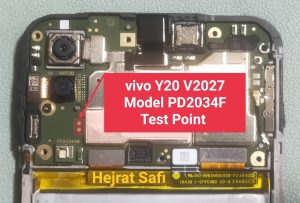
Vivo Y20 motherboard highlighting the two exact gold test points
3. Trigger EDL Mode (QDLoader 9008): Connect one end of the USB cable to your PC. Using metal tweezers, short (bridge) the two EDL test points together. While holding the tweezers in place, plug the USB cable into the phone.
4. Verify Connection: Check your PC’s Device Manager under “Ports (COM & LPT).” You should see “Qualcomm HS-USB QDLoader 9008.” If you see this, the device is successfully in EDL mode.
5. Remove FRP via Software: Using your chosen software (like QFIL with the correct firehose file, or a technician tool), execute the command to erase the FRP partition.
6. Reassemble: Disconnect the phone, reconnect the battery flex cable, and power the device on. The Google account lock will be removed.
(Note: Professional technician software like UMT or UnlockTool are paid, licensed tools designed for repair shops, not free consumer software. If you do not own these, you will need to rely on QFIL and source the exact firehose files for your specific model build).
If you are uncomfortable with these steps: Stop here. Taking the device to a repair professional is significantly cheaper than replacing a motherboard you accidentally short-circuited.
Unsupported Methods to Avoid on Vivo Y20
When searching for a Vivo Y20 FRP bypass, you will likely encounter outdated or malicious tutorials. To save time and protect your device, avoid the following methods, which no longer work on recent security patches:
- SIM Pin Code Tricks: Inserting a SIM card with a PIN lock and swiping the notification bar is completely patched on Android 11 and Android 12.
- Basic Talkback Glitches: Older methods involving swiping wildly on the screen while Talkback is enabled to crash the setup wizard are no longer functional.
- “Universal FRP Unlocker” Software: Be highly suspicious of free PC software claiming to unlock any Android phone with one click. These are almost always fake and frequently contain malware, ransomware, or crypto-miners.
- Unverified Remote Unlocking Services: Paying a stranger online to remotely control your PC and unlock your phone carries significant security risks and often results in scams. Stick to local, reputable repair shops if you need professional help.
Frequently Asked Questions
How do I bypass FRP on Vivo Y20 without a PC?
Bypassing FRP without a PC is only possible if your Vivo Y20 is running an older Android 11 security patch. You can achieve this using the Talkback browser exploit and transferring the Activity Launcher app via EasyShare. If your phone is on Android 12, “No PC” methods are fully patched and will not work.
What should I do if Activity Launcher is not working during FRP bypass?
If Activity Launcher crashes or fails to open on your Vivo Y20, it means your device’s software is updated to Android 12, which actively blocks this exploit. You must stop trying manual software methods and switch to a hardware-level EDL Test Point bypass.
How do I enter EDL mode on Vivo Y20 V2027?
To enter EDL (Emergency Download) mode on the Vivo Y20 V2027, you must remove the phone’s back cover, disconnect the battery, and use metal tweezers to short the two specific EDL test points on the motherboard while simultaneously plugging the device into a Windows PC via USB.
Which unlock tool works for Vivo V2029 running Android 12?
For a Vivo V2029 on Android 12, you must use tools that support Qualcomm EDL mode operations. QFIL is a free option (requiring specific firehose files), while professional repair technicians typically use paid licensed software like UMT (Ultimate Multi Tool) or UnlockTool.
How can I remove the Google account lock if the Talkback method is patched?
If the Talkback method is patched and blocks browser access (often via a “YouTube Update Required” screen), you have two options: use the PC-based EDL Test Point method, or take the device, along with your proof of purchase, to an authorized Vivo service center for an official unlock.
Final Verdict: When to Seek Professional Repair
Bypassing the FRP lock on a Vivo Y20 (V2027/V2029) ultimately comes down to your current Android version. If you are fortunate enough to be running Android 11, manual “No PC” exploits like Activity Launcher and EasyShare offer a straightforward path back into your device.
However, Android 12 users face significant barriers. Because software vulnerabilities have been aggressively patched, recovering a fully updated Vivo Y20 requires a Windows PC, hardware disassembly to reach EDL test points, and specialized software.
If removing the back cover of your phone, voiding your warranty, or working with bare motherboard components seems too risky or confusing, that is a clear stopping point. At this stage, your safest and most practical option is to take the device to a reputable local repair technician who has the proper tools and experience. Alternatively, if you are the original owner and have a valid proof of purchase, contacting an authorized Vivo service center remains the most secure, official way to regain access to your phone.
Related Articles