How to Realistically Bypass FRP with ADB in 2025 (A Step-by-Step Guide)
ADB FRP bypass fails with an unauthorized error because USB debugging is off. Our guide shows the only way to enable it (Samsung’s *#0*# method) and the commands that work.
Facing a Google account verification screen on a device you own is incredibly frustrating. You’ve likely searched for how to bypass FRP with ADB, run a few commands, and been stopped by a single, discouraging word in your terminal: unauthorized.
Many online guides make it seem simple, but they omit the most critical detail: ADB commands only work if USB debugging is already enabled, which is impossible to do from the settings on a locked device. This guide gets straight to the point. We’ll show you the real-world, device-specific techniques required first to establish a connection and then successfully bypass a Google account with ADB.
First, Check if an ADB Exploit is Even Possible
Before you begin, it’s essential to understand that security loopholes are constantly being closed. A method that worked on Android 11 is almost certainly patched on Android 14. This table gives you a realistic overview of the most common public exploits.
| Brand | Android Version | Common Exploit | Status for 2025 |
| Samsung | Android 10-11 | Test Mode *#0*# |
Often Viable. Still works on many outdated or older models. |
| Samsung | Android 12-14 | Test Mode *#0*# |
Patched. This exploit was closed in security updates from mid-2022 onward. |
| Motorola / MTK | All Versions | EDL / BROM Mode | Viable, but High Risk. Requires specialized tools and carries a risk of bricking. |
| Google Pixel | Android 12-14 | (None Publicly Known) | Highly Secure. No simple code or exploit exists to enable ADB from the setup screen. |
If your device is running a recent security patch, a direct ADB command is not your starting point. You first need a way to enable USB debugging.
How to Enable USB Debugging on an FRP-Locked Phone
This is the step where most guides become vague. Because there is no universal solution, the technique you use depends entirely on your device’s brand, model, and security patch level. Here are the actionable methods, from simplest to most advanced.
Method 1: For Older Samsung Galaxy Devices (Test Mode *#0*#)
On many Samsung models, particularly those still running Android 10-11, you can access a hidden hardware test menu that can be used to enable ADB.
- On the initial “Welcome” screen, tap Emergency Call.
- Dial the code
*#0*#. The device should immediately enter a diagnostic screen with various tiles. - Connect the phone to your computer via USB. At this point, specialized PC tools can use this interface to send a command that triggers the “Allow USB debugging” prompt on your phone’s screen.
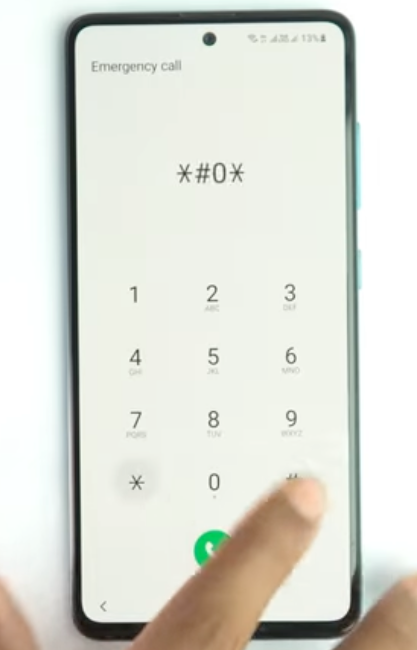
The Samsung test mode screen, accessed by dialing *#0*# on the emergency dialer.
Method 2: Advanced Options for Newer or Non-Samsung Devices
When the *#0*# method fails (as it will on most updated phones), you must use more technical, low-level methods. These procedures carry risk and require a high degree of care.
For Newer Samsung: Combination Firmware
Combination firmware is official engineering software used for diagnostics. Flashing it via a tool like Odin can enable ADB by default.
- Where to Find Firmware: Use trusted sources like SamFW or Frija. Never download from unverified links.
- The Critical Safety Check: Before downloading, you must match the firmware’s binary version to your device’s bootloader. You can find your phone’s build number on the recovery mode screen. In a build number like
A536U1UEU**4**BWA5, the4is the binary version. Flashing firmware with a lower binary number will fail and can potentially brick the device.
For Motorola and MTK-Chipset Devices: EDL Mode
Many non-Samsung devices, especially those with MediaTek (MTK) or Qualcomm chips, have an Emergency Download (EDL) Mode. This low-level mode allows direct communication with the device’s storage.
- You will need a specialized PC tool (e.g., SP Flash Tool for MTK devices).
- You must force the device into EDL mode, which often requires a specific button combination or “test points” on the device’s motherboard.
- Once connected, the tool can be used to either enable ADB or directly reset the FRP partition. In Windows Device Manager, the phone will often appear as “QHSUSB_BULK” or a “MediaTek USB Port” when connected correctly.

Windows Device Manager showing the correct USB drivers installed for an FRP bypass via EDL mode
Pro Tip for Technicians: When flashing firmware or using low-level tools, always use a high-quality USB cable and connect directly to a motherboard USB port, not a front-panel port or hub. This minimizes the chance of a connection drop during a critical write process.
Executing Commands After Enabling ADB
If you have successfully used one of the methods above and adb devices now shows device instead of unauthorized, you are ready to send the bypass commands.
Using an FRP Bypass ADB Command (Android OS Running)
This method is used after a technique like Samsung’s test mode has successfully enabled ADB while the phone is on the setup screen.
- Open a command prompt or terminal on your computer.
- Verify the connection is authorized:
adb devices(The output should show your serial number followed by device.)
- Open a remote shell and send the command to skip the setup wizard.
adb shell content insert --uri content://settings/secure --bind name:s:user_setup_complete --bind value:s:1This FRP bypass adb command tells the system the setup is finished, which should take you directly to the home screen.
Using Fastboot Commands for FRP Bypass (Bootloader Mode)
Fastboot is a different protocol used when your device is in its bootloader, before Android starts. This is often confused with ADB.
- Enter Bootloader Mode: Since your device is
unauthorized, theadb reboot bootloadercommand will not work. You must use the physical keys.- First, power off the device completely.
- Then, press and hold the required key combination (e.g., Power + Volume Down on most models) until the bootloader screen appears.
- Connect the phone to your computer.
- Verify the fastboot connection in a terminal:
fastboot devices- If the device is detected, use one of the following commands to wipe the FRP partition:
# Command used on many stock Android devices fastboot erase frp # Alternative command for some manufacturers fastboot oem frp-eraseThis command directly clears the lock data. After it completes, reboot the device.
Troubleshooting ADB Connection Issues
A stable connection is everything. If adb devices gives an unexpected output, here’s how to diagnose it.
Problem: Device Not Found (Blank Output)
This means your computer doesn’t see the phone at all. It is almost always a driver issue.
- Check Device Manager (Windows): Look for your phone, possibly with a yellow exclamation mark under “Other devices.”
- Install Official OEM Drivers: Generic drivers often fail.
- Reset the Server: Unplug the phone, type
adb kill-serverin your terminal, and then reconnect the device.
Problem: Device Status is unauthorized
This is the main obstacle. It confirms your drivers are correct and the computer sees the phone, but USB debugging is turned off. You cannot fix this with a command. You must use one of the brand-specific techniques mentioned earlier to enable ADB from the setup screen.
Choosing Your Method: Manual vs. Automated Tools
Once you know the correct procedure, you can perform it manually or use a dedicated tool. Here is an objective breakdown to help you decide.
| Criterion | Manual Command-Line Methods | Professional FRP Software |
| Success Rate | Conditional. Depends on finding the correct, unpatched exploit for your specific model and security update. | Reliable for Supported Models. Automates the correct process and is consistently updated for new devices and security patches. |
| Time Cost | High. Requires significant time for research, finding correct files, driver troubleshooting, and trial-and-error. | Low. The entire process is guided and typically takes only a few minutes. |
| Technical Skill | High. Requires comfort with command-line, device boot modes, and finding specific firmware or tools independently. | Low. Designed with a simple user interface that handles technical steps automatically. |
| Safety Risk | Moderate to High. Flashing an incorrect firmware file is a common cause of a “bricked” or inoperable device. | Low. Uses tested, non-destructive processes designed to protect your device during the unlock. |
Frequently Asked Questions (FAQ)
Can I bypass FRP with ADB if USB debugging is OFF?
No. This is the central challenge. If USB debugging is off, your device will always report an unauthorized status, blocking all ADB commands. The entire process hinges on finding a method to enable it first.
What is the exact ADB command to remove the Google account lock?
There isn’t one universal command. The most common is skipping the setup wizard. Its success depends entirely on your phone’s model and Android version.
How do I change my phone from ‘unauthorized’ to ‘authorized’ without Settings access?
You must use a device-specific exploit. For older Samsung phones, this is the *#0*# test mode. Many other modern devices require advanced methods like flashing combination firmware or using low-level communication modes like EDL.
What’s the difference between ADB and fastboot for FRP removal?
ADB communicates with a running Android OS (even on the setup screen). Fastboot communicates with the device in its bootloader, before the OS loads. They are separate tools for different states.
Why do YouTube videos show one-click ADB tools that fail on my Android 13/14 phone?
Those videos often feature devices with outdated security. Google and manufacturers constantly patch the vulnerabilities these tools rely on. A tool built for an Android 11 security flaw will not work on a fully updated Android 14 device because that flaw no longer exists. You can find the Proven Method to bypass FRP on Android 14 in 2025 here >>
Conclusion
Successfully bypassing Factory Reset Protection with ADB is a two-step process: first, you must find a way to enable USB debugging, and only then can you execute the final commands. The persistent unauthorized error isn’t a dead end—it’s a signpost telling you to focus on that preliminary step.
As we’ve shown, the manual methods for enabling ADB are highly technical, specific to older models, or carry significant risk if performed incorrectly. Finding the right firmware and tools can take hours of searching and troubleshooting.
For a reliable and safe solution that handles these complexities for you, we recommend a professional tool like DroidKit. It is updated to work with the latest security patches and automates the correct, model-specific procedure. You can regain access to your device in minutes, sidestepping the risks of manual flashing.
More Related Articles
- How to Bypass FRP Using TalkBack in 2025: An Honest Guide
- Google FRP Lock Bypass with Odin: The Real Method for 2025
- How to Use Easy Flashing FRP Bypass 8.0 APK