Easy Flashing FRP Bypass 8.0 APK: Your 2025 Guide
Our guide provides the verified easy flashing frp bypass 8.0 apk (Android 8) and Google Account Manager. We show the tested, ‘no PC’ TalkBack method to remove the lock.
Seeing the “Verify your account” screen on an Android 8.0 Oreo device after a reset is a common roadblock, especially if you’ve bought a second-hand phone and can’t contact the previous owner. You’re left with a device you own but can’t use. Many online tutorials add to the confusion with broken links or files that could contain malware.
This guide provides a direct solution using a tested easy flashing FRP bypass 8.0 APK. We will walk you through a proven procedure for the FRP bypass APK Android 8.0 method, helping you regain access to your device. Our goal is to provide a clear and safe process for navigating the Google Account Verification lock. We will address the common points of failure and give you a reliable course of action, starting with how to prepare your tools safely.
Before You Begin: Essential Tools & Safety Check
To set expectations clearly, this “no PC” method for the phone still requires a second device for preparation. Here is what you need to have ready:
- The locked Android 8.0 phone with a reliable Wi-Fi connection.
- A separate computer or another phone to download and verify the necessary files.
- A USB-OTG adapter and a small USB drive to transfer the verified files to the locked phone.
⚠️ Safety Tip: Verify Your Files. Success depends on using two specific files: Google Account Manager (GAM) and the FRP Bypass tool. The single biggest reason this process fails is using a mismatched or corrupted file. We strongly recommend downloading these files on a PC first. You can use a free tool like OnlineMD5 to verify they are safe before transferring them to your phone.
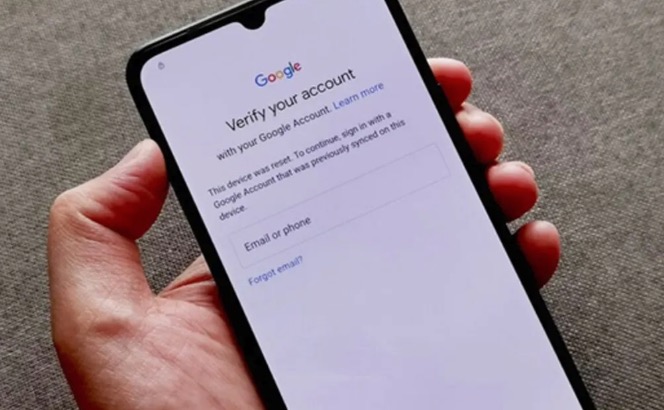
A smartphone displaying the Google Account Verification screen
Step-by-Step: Bypassing Google Account Verification on Android 8.0
This procedure is designed to be performed on the device itself after you have prepared the files. The first—and often most difficult—step is getting a web browser open from the setup screen.
Step 1: How to Access the Browser (TalkBack Method)
This procedure is designed to be performed on the device itself after you have prepared your files. The first—and often most difficult—step is getting a web browser open from the setup screen so you can access your file manager.
1. Enable TalkBack
- For Samsung devices with a Home button: Triple-tap the Home button quickly.
- For devices without a Home button: Press and hold two fingers on the screen for several seconds until you hear a confirmation.
2. Open the Global Context Menu
Once the feature is active and speaking, draw a large ‘L’ shape on the screen to bring up the Global Context Menu.
3. Navigate to Help & Feedback
- Tap TalkBack Settings once to focus, then double-tap to select it.
- Use two fingers to scroll down the menu and select Help & feedback.
4. Launch the Browser via YouTube
- In the help section, find any article that contains a YouTube video.
- Tap the video’s title to open it in the YouTube app.
- From YouTube, tap the user icon (top-right), then navigate to Settings > About > Google Privacy Policy.
- This will finally open the Google Chrome browser.
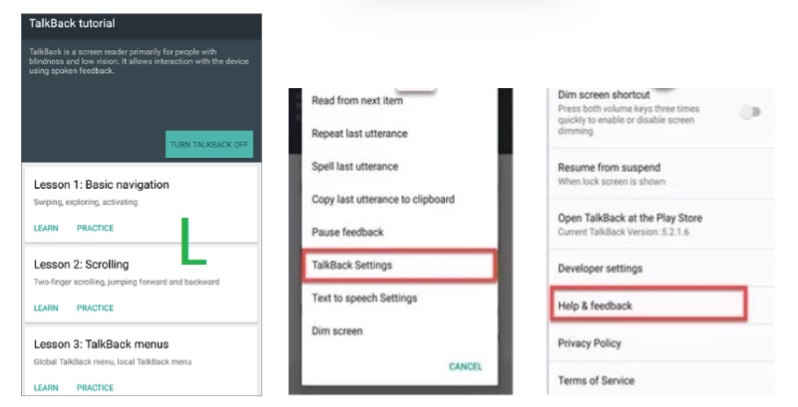
Step-by-step visuals for the Android TalkBack Help & Feedback FRP bypass method
Troubleshooting TalkBack: If the ‘L’ Gesture Fails
On devices with newer security patches, the ‘L’ gesture is often disabled. Don’t give up.
- Try the Sub-Menu: Look for an alternative path like Vision Settings > TalkBack > Settings. Search inside that menu for a ‘Help’ or ‘Policy’ link.
- Alternative Method (SIM PIN): Insert a SIM card with a PIN lock enabled. Enter the wrong PIN three times to lock the SIM. When the PUK code prompt appears, swipe down the notification panel to access the main Settings gear icon.
Step 2: Install the Android 8 Oreo FRP Bypass APK Files
Once you have a browser open, you can proceed with the installation. We recommend using your USB-OTG adapter to access the safe files you verified earlier.
Recommended File Names to Search For:
- Google_Account_Manager_8.0_Oreo.apk
- FRP_Bypass.apk(Note: Look for these on reputable repositories like APKMirror or UpToDown)
Installation Procedure:
1. From the browser, open the phone’s File Manager (or ‘Downloads’) to view your USB-OTG drive.
2. Critical Step: Install Google_Account_Manager_8.0.apk first.
- Note: Your phone will block the installation. When prompted, go to Settings, enable ‘Install from unknown sources’, then go back and complete the installation.
3. Once GAM is installed, proceed to install FRP_Bypass.apk.
4. After installation, open the FRP Bypass app.
5. It will show a password entry screen. Look for the three-dot menu icon in the top-right corner and select Browser sign-in.
6. This redirects you to a standard Google login page. Sign in with any active Google account you own.
7. Restart the device.
When the phone reboots, continue with the setup wizard. The device will now say “Account Added,” allowing you to bypass the lock.
Comparison: APK Method vs. PC Tools
If you cannot get a browser to open or the ‘Browser sign-in’ option fails, your device’s security patch has likely fixed the vulnerability this method relies on. Understanding your options will help you make an informed decision.
| Feature | On-Device APK Method | PC-Based Tool |
| Success Rate | Medium to High on older security patches; Low on new. | High, as it uses a more direct, low-level communication. |
| Time Cost | 15-30 minutes if the vulnerability is present. | 30-60 minutes, including PC setup and driver installation. |
| Technical Skill | Basic (following on-screen steps). | Intermediate (requires PC software and USB driver knowledge). |
| Safety Risk | Low, if APKs are verified with hashes as instructed. | Varies; requires downloading software from trusted sources. |
If the on-device method is not working, a PC-based tool is the most effective next step for your Factory Reset Protection issue.
Fallback Plan: When the On-Device Bypass Fails
If you find yourself stuck, a dedicated PC-based software tool is the most reliable alternative. When the APK method failed on a friend’s Huawei Y5 due to a newer EMUI patch, a PC tool quickly resolved the issue. These programs work by putting the device into a special diagnostic mode to bypass the lock.
To find the right tool, search for one specific to your device’s brand and the mode it uses. This will give you much more accurate results.
- For a Samsung device:
Samsung FRP tool for PC Download Mode - For a Huawei device:
Huawei FRP reset tool Fastboot mode - For a device with a Qualcomm CPU:
Qualcomm EDL mode FRP reset tool
Expert Tip: Always download PC tools from reputable developer communities like XDA-Developers to avoid malware risks.
Understanding FRP: Compatibility and Legal Considerations
Factory Reset Protection (FRP) is a security feature designed to block access after an unauthorized factory reset. This easy flashing FRP bypass APK method works because it exploits specific vulnerabilities in earlier Android 8.0 security patches.
| Device / OS Version | APK Method Success Likelihood | Notes |
| Samsung on Android 8.0 (early security patch) | High | TalkBack vulnerabilities are often present. |
| Huawei on EMUI 8.0 (based on Android 8.0) | Medium | EMUI customizations can alter the standard procedure. |
| Any device with a late 2018 or newer patch | Low | Most known exploits for browser access are patched. |
| Any device on Android 9.0 or newer | Very Low | The underlying system architecture was changed, blocking this technique. |
Legal and Ethical Disclaimer
This guide is for legitimate device owners who are locked out of their own property. Using these methods to access a device you do not legally own is prohibited in most regions. We do not condone using this information for illegal activities.
Frequently Asked Questions
What do I do if the Google Account Manager APK fails to install?
An installation failure usually means a version mismatch. Android 8.0 and 8.1 require the corresponding GAM version. If the 8.0 APK fails, try finding and verifying a trusted Google Account Manager 8.1 APK and repeat the process.
The ‘Browser sign-in’ button is greyed out or does nothing. What’s wrong?
This typically happens when the Google Account Manager was not installed correctly or is the wrong version for your device’s framework. Reinstall the GAM 8.0/8.1 file. If that doesn’t work, the security patch on your device has likely disabled this function, and you will need to use a PC-based tool.
Will this work on Android 9 or EMUI/MIUI based on Android 8?
The chances of this method working on Android 9 or newer are extremely low, as the vulnerabilities were fixed. It may work on manufacturer skins like EMUI 8, but custom software can block the process.
What are the risks of using an FRP bypass APK?
The main risks are malware from unverified APK files and, in rare cases, software issues if the process is not followed correctly. The bypass itself is not designed to wipe data. You can eliminate the malware risk by following our guide to verify the file’s SHA-256 hash on a separate computer before transferring it to the locked phone.
If the APK method fails, what is the best PC-based fallback?
The most reliable alternative is a PC-based tool made for your phone’s brand. For example, search for “Samsung Odin FRP reset” or “Huawei Fastboot FRP tool.” These programs communicate with the phone at a lower level and have a much higher success rate on patched devices.
Conclusion
Being locked out of your phone by Google’s FRP is frustrating, but it is a solvable problem. By following this tested on-device procedure, you can safely regain access to compatible Android 8.0 Oreo devices. The keys to success are preparing verified files on a separate device, installing them in the correct sequence, and knowing when to switch to a PC-based tool if your phone’s security is too new. You now know to take back control of your device without depending on unsafe, unreliable sources.
More Related Articles
- The Pro’s Guide to Chimera Tool in 2025
- The Z3X Samsung Tool in 2025: A Technician’s Guide to Modern Android Servicing
- Google FRP Lock Bypass with Odin: The Real Method for 2025